Advanced Audio & Zone Controller
Product Image
Live Preview

🔊 Advanced Audio & Zone Controller

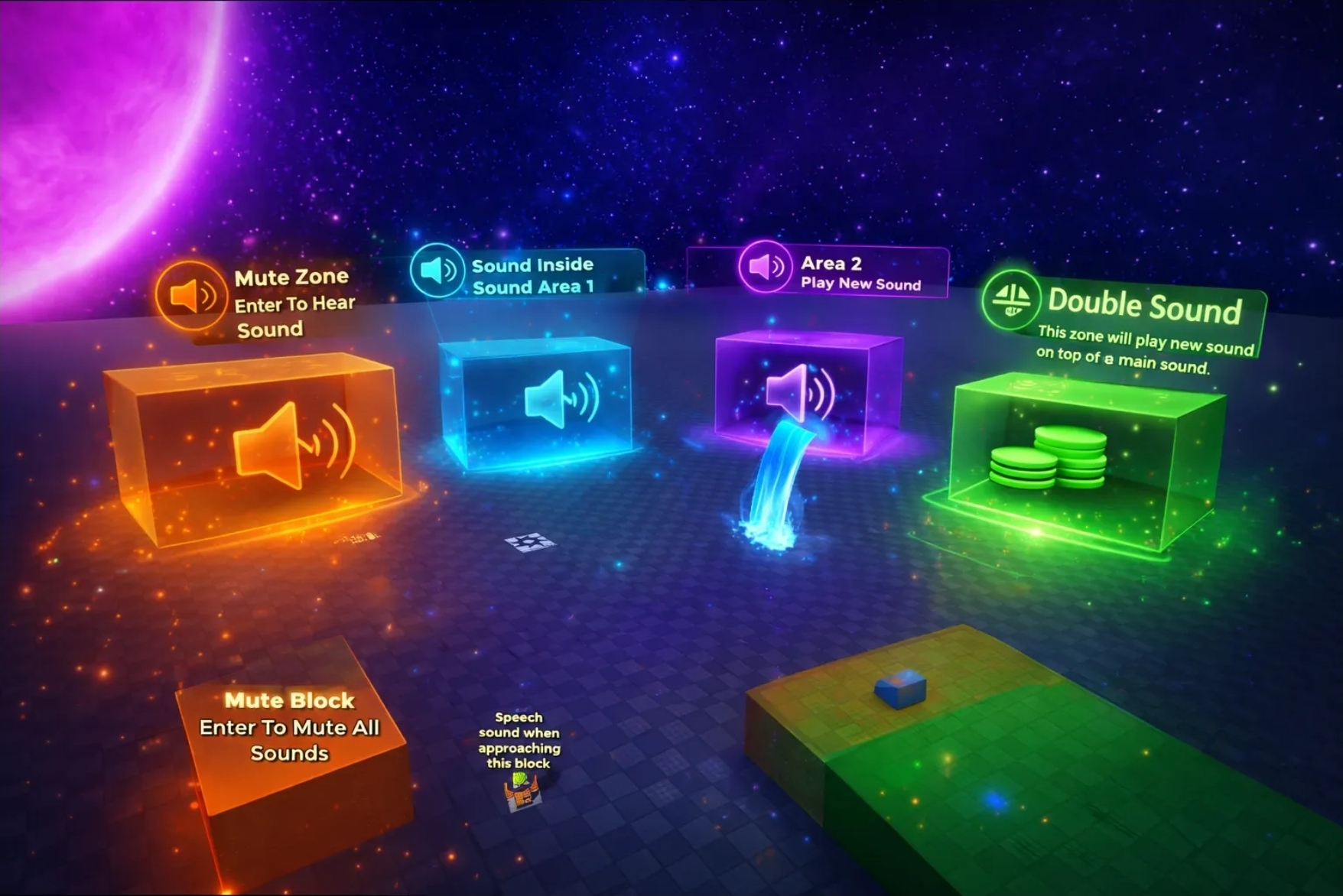
This system offers five powerful modes that can be combined in any way to create a fully immersive soundscape:


  1. Dynamic Sub-Zones (Music Switching): Enter a main area to hear the background music. When you enter a smaller sub-zone within that area, the main music fades out while the new sound fades in. Once you leave the sub-zone, the main music seamlessly returns.
  2. Proximity & Distance Effects: Perfect for environmental sounds like waterfalls or campfires. The audio naturally fades in as you approach the object and fades out as you walk away, creating a realistic 3D atmosphere.
  3. NPC & Interaction Audio: Easily trigger NPC speech, sound effects, or ambient character noises when players are nearby.
  4. Master Mute Zones: Create "Quiet Zones" where all active music and ambient sounds are silenced. This is ideal for cutscenes, secret areas, or transition hallways.
  5. Layered Soundscapes: Play multiple sounds simultaneously. You can have a "Main" ambient track playing, and as you enter specific spots, extra layers (like rain, wind, or tension music) will play on top of the existing audio.


    Undless Possibility 


🛠 How to Use

The script is built to be name-agnostic, meaning it will detect your folders and sounds regardless of what you name them, as long as the Main Folder names remain unchanged.


  • Customization: You can create unlimited new areas. Simply create a new folder (e.g., MyForestZone) and follow the internal structure of the example files.
  • Flexibility: The script adapts to your preference. If your sound is inside a Sub-folder, it will find it. If your sound is inside a Part, it will find it there too.
  • Universal Combinations: Any combination of the modes above can be achieved. You can have a Mute Zone inside a Layered Zone, or a Waterfall effect inside a Sub-Zone—the script handles the logic automatically.

Important Setup Notes:

  • Collision: Ensure all "Zone Parts" have CanCollide set to Off.
  • Sound Settings: For the smoothest experience, set your Sound objects to Volume 0, ensure Playing and Looped are checked, and the script will handle the fading.

[!TIP] Support: This system is designed to be "plug-and-play." However, if you run into any issues or need help setting up a specific combination, I am always just one DM away!


Test System Here

https://www.roblox.com/games/89564986851531/Advanced-Zone-Sounds

More items by Evil Axe Studios
View author profile
Add to Cart
$2.99 USD
  • 3 Months Free Support
  • Free Lifetime Updates
  • Buy With Confidence
  • You may use this in any game or project, but resale is not permitted.
Author Image
Evil Axe Studios
Member since Aug, 2025
(2)
  • Author Level
0 Sales
Product Information

We may use cookies and other tracking technologies when you visit our website, mobile site, or mobile application. These technologies help us customize the Platform, improve functionality, analyze usage, and enhance your overall experience on BloxDen. learn more

Allow